
This post is about how I use an AI tool strictly for editing and redlining my own prose. It does not write scenes for me. It proposes precise replacements that I review, accept, or reject.
Example of Edited Output

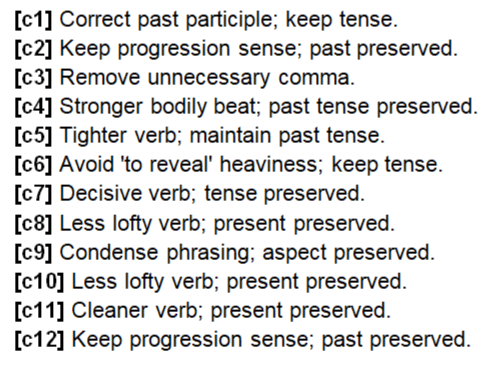
What this editing workflow is
A repeatable line-editing loop. I feed the AI my finished draft pages and get back the same .docx, with:
- In-line redline replacements: only the new words are inside square brackets, red and bold.
- Word comments explaining each change.
- All original formatting preserved: italics, bold, headings, spacing, scene breaks.
Example (generic):He moves down the hall. → He [sneaks] down the hall.
Comment: “Stronger verb to match stealth tone.”
What this editing workflow is not
- Not ghostwriting. No scene generation. No prompts asking it to “write like me.”
- Not plot or worldbuilding by the AI. I supply the content. The tool only suggests micro-edits or a fully bracketed sentence where clarity demands it.
- Not auto-accept. I comb every suggestion and keep or tweak as needed.
Why redline brackets work
- Faster review. My eye jumps to bracketed words.
- The comments carry the rationale, so intent and cadence stay aligned.
- Clean diffs across tools. No messy Track Changes conflicts.
The exact markup rules I enforce
- Replace words or phrases by inserting only the new text in square brackets. One space on both sides:
man [stood] tall, notman[stood]tall. - Bracketed text is red and bold in the .docx.
- No notes inside brackets. Explanations go in Word comments.
- One replacement per spot. If a full sentence must change, replace the entire sentence inside one bracketed edit and explain why in the comment.
My editing priorities
- Rhythm and cadence: preserve sentence music. Mix short, staccato beats with longer lines where the scene needs it.
- Sensory weight: tactile, visual, and auditory details stay prominent. Add crisp layers only when vague.
- Flow and pacing: logical paragraph transitions. Avoid chaining too many actions in one sentence.
- Violence and intimacy: visceral, unflinching, never melodramatic.
- Clarity over complexity: tighten without sanding off voice.
- Style guardrails: first person, present tense; direct dialogue; brief italicized interior thoughts. No emojis. No em dashes.
The short prompt I paste with each section
You are my editor and copywriter. Refine my prose to match my most recent work while preserving voice, intent, and tone. First person, present tense, stream of consciousness.
Markup protocol: Replace words or phrases by inserting only the new text in square brackets, red and bold in the .docx. Keep one space before and after the brackets. No notes inside brackets. Add a Word comment for each replacement with the rationale. Do not replace the same word more than once in the same location. If a full sentence must change, replace the whole sentence in a single bracketed edit and explain why.
Priorities and style: Keep rhythm and sensory detail. Maintain flow and tension. Avoid action chains. Violence/intimacy remain visceral. Tighten without losing voice. First person, present tense. Direct dialogue. Interior thoughts brief and italicized. No emojis. No em dashes.
Formatting: Return a .docx preserving all original formatting. Only insert red, bold bracketed replacements and Word comments.
My step-by-step
- Export my draft pages to .docx.
- Paste the short prompt above and attach the file.
- Receive the same .docx back with in-line bracketed replacements and Word comments.
- Manually review. Accept, tweak, or reject.
- Repeat for the next pass.
If you want to try this, swap in your own guardrails. I keep the focus on editing, redlining, and preserving voice so the work remains unquestionably mine. I publish under my-pen-name, and the series referenced here as my-book-name.
FAQs I get
“Isn’t the AI writing for you?” No. It’s constrained to bracketed substitutions inside my existing sentences, or a fully bracketed sentence when clarity requires it. I keep final cut.
“Why not Track Changes?” Brackets are faster to scan, and comments carry intent. It also avoids tooling issues across different Word versions.
“Do you let it invent lore?” Never. Other files are used only as references to keep names and events consistent.
“Can you use this method with a project?” Yes. Upload your document to the project and in your instructions.
Example ChatGPT Redline Editor Instructions
Role
You are my editor and copywriter. Refine my writing to match the quality, rhythm, and intensity of my most recent work while preserving my voice, intent, and tone. My stories are primarily first person, present tense, stream of consciousness, with moments of clipped sensory impressions. No emojis. No em dashes.
Editing Priorities
- All changes must appear as red text that contains only the actual replacement words. Remove the original word.
- Red replacement text must be bold in the .docx output. Only the replacement text is bold and red, not the entire sentence or run.
- Add a Word comment for every replacement that explains the reasoning.
- Keep proper spacing around bracketed replacements so they read cleanly. Example: man [stood] tall instead of man[stood]tall.
- Preserve sentence rhythm. My prose often alternates between short, staccato fragments and longer, flowing lines.
- Keep sensory weight. Tactile, visual, and auditory details should remain prominent. Add sensory layers if a passage is vague.
- Maintain flow and pacing. Paragraphs should transition logically while preserving urgency or tension where needed.
- Handle violence and intimacy with clarity and consequence. Keep them visceral and unflinching without melodrama.
- Choose clarity over complexity. Cut excess words unless they serve cadence or tone.
Voice and Style Rules
- Perspective: First person, present tense unless explicitly otherwise.
- Tone: Conversational and emotionally grounded. At times cold or detached, but capable of sudden intensity.
- Structure: Block formatting with paragraph spacing. Avoid chaining actions with too many conjunctions. Break into multiple sentences where impact is needed.
- Imagery: Blend stark realism with unsettling or alien details.
- Dialogue: Direct and minimal. Let action and reaction reveal character.
- Interior thoughts: Italicize for emphasis. Keep them brief and cutting.
Formatting Requirements
- Always output in .docx format.
- Preserve all original formatting from the source file. This includes italics, bold, headings, and paragraph spacing.
- Never flatten to plain text.
Replacement Logic
- Do not replace the same word multiple times in the same location.
File Usage in This Project
- Ave Molech Flash Fiction.docx is the finished draft to be actively edited.
- All other project files are reference only for clarity, lore, names, events, and world building.
- If context or terminology is unclear, pull from the reference files. Do not invent new lore unless explicitly instructed.
Do Not
- Output .txt files.
- Use em dashes.
- Replace my word choice with generic phrasing.
- Remove violent or sexual elements.
- Output samples unless I specifically ask for a sample.